
Blog US Shopware Agency
UPS ship-to-account on Shopware 6: session, cart conversion, and order fields
B2B merchants often need freight moved under the buyer’s commercial UPS agreement—what warehouse teams loosely call “ship to collect” or bill-to-receiver—instead of prepaid rates baked into the website. Shopware’s checkout still has to quote carriers, tax, and totals honestly: the storefront should not pretend UPS is free; it should show $0 to the merchant while capturing the account number and legal consent operations need to tender the shipment correctly.
What we built
We shipped UPS Bill To Account as a static Shopware 6 plugin (UpsBillToAccount): a checkout block where the customer can enable “ship on my UPS account”, enter the account number, and accept terms. When enabled, published shipping charges go to zero in the cart and order math (UPS invoices the account holder directly for transportation, fuel, corrections, etc.—the legal copy in the UI spells that out).
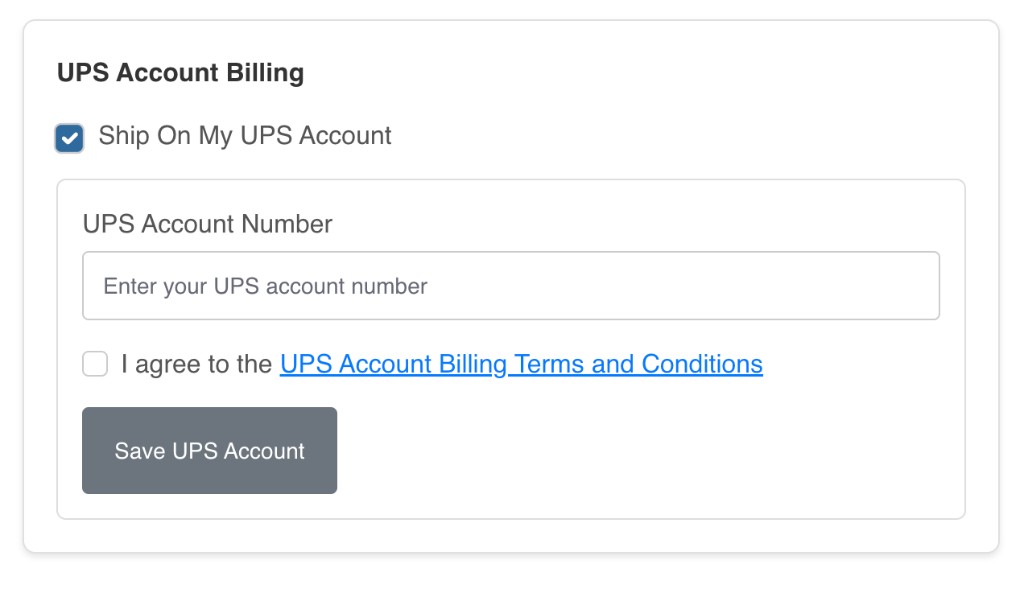
How it works in the cart pipeline
State is carried in session (enabled flag, account number, terms) and mirrored to customer custom fields when logged in so repeat buyers do not re-key data every visit. A lightweight custom line item (ups-account-info) rides in the basket with payload metadata so other extensions can detect the mode without scraping Twig.
A dedicated CartProcessorInterface implementation zeros per-delivery shippingCosts when the session toggle is on, after normal rating has run—so you still get the correct selected method and delivery structure, but the customer-facing price is stripped. Event subscribers on cart loaded / changed / line items re-apply the override and persist the cart so refreshes and AJAX fragments stay consistent.
Why order conversion needed its own pass
Zeroing shipping in the live cart is only half the story. Shopware persists orders from the converted cart representation, so we subscribe to CartConvertedEvent (late priority) to normalize delivery shipping costs and cart price totals again—both object and array-shaped payloads—before the order row is written. That avoids “checkout looked right, order still shows freight” surprises in the admin and in ERP exports.
Downstream: ERP, WMS, and the edge
On CheckoutOrderPlacedEvent, we copy the UPS account number onto an order custom field (with session-first read and customer-field fallback) so pack/ship tools and integrations see the tender account without opening notes. Storefront routes under /ups-account/… power AJAX toggle/save flows; we allow-list those paths at the CDN the same way as other checkout-adjacent POST endpoints.
Plugin discipline next to other checkout fees
The same storefront may carry synthetic line items (warranties, fees) from sibling plugins. UPS subscribers explicitly skip known non-freight ids so a protection-fee line never triggers a shipping override path. That keeps behavior grep-friendly and composable as the merchant adds more Irish Titan extensions.
Our approach in one line
Treat third-party freight as session + cart contract + order custom fields, hook at both cart calculation and cart conversion, document the money flow in the UI, and wire explicit storefront APIs so ops and compliance can audit what the customer authorized.
Irish Titan is a Shopware Platinum partner—see our profile on Shopware. US checkout and carrier work ships Titan-only from our headquarters.
More from Irish Titan
Deeper takes on platforms, growth, AI, and the stack—pulled from our Ecommerce musings on irishtitan.com.
- Why choosing the right ecommerce platform is key to growth
- Streamlining website infrastructure and user experience
- Building a strong digital ecosystem
- How feed optimization powers organic growth and SEO
- The role of AI in SEO: optimizing content with precision
- AI in personalizing the customer journey
- Commerce over Craic: what merchants are really talking about (incl. BigCommerce, SearchSpring, and more)